The Duplicate Current Scenario command in GeoHECHMS allows the user to make an identical copy of the current scenario (plan). This copy is independent of and does not interact with the original after it has been made. The user also has the option to make a copy of the current basin, meteorological, and control specification data.
Follow the steps given below to use the Duplicate Current Scenario command:
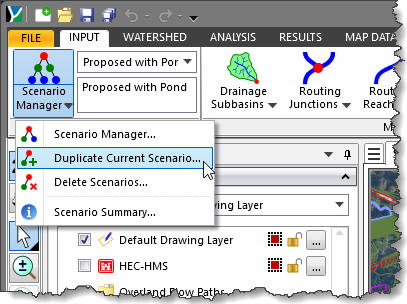
- From the Input ribbon menu, click the Scenario Manager dropdown menu and select the Duplicate Current Scenario command.
- The Duplicate Current Scenario dialog box will be displayed.
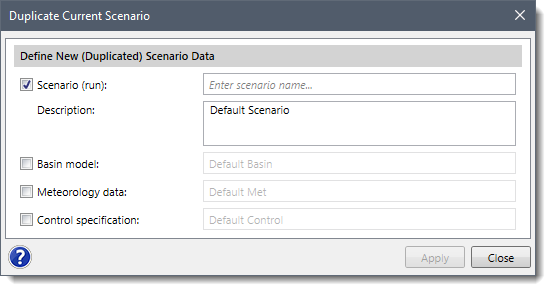
- Enter the scenario name in the Scenario (run) checkbox entry field to create an identical copy of the current scenario (run). By default, the Scenario (run) checkbox is checked. If unchecked, then the Scenario (run) entry and Description fields are disabled.
- Enter the description in the Description field to describe the scenario.
- By default, the software utilizes the current scenario’s basin model, meteorological data, and control specifications for the duplicated scenario.
- Additionally, the user can check the Basin model, Meteorology data, and Control specification checkboxes to make identical copies of the current scenario’s basin, meteorological, and control specification data. Note that this is useful when creating alternative designs for comparison, such as when comparing detention and retention pond designs for different storm events.
- Click the [Apply] button, and a copy of the current scenario will be created.
![Click the [Apply] button](/wp-content/uploads/sites/25/2021/09/Duplicate-Current-Scenario-HEC-HMS-Imge-3.png)
Note: When the Basin model checkbox is selected, the software creates copies of any paired data associated with the basin model and assigns each duplicated scenario its own unique paired-data references.
This behavior ensures that the original and duplicated scenarios remain completely independent. As a result, any changes made to the basin model or its associated data in the duplicated scenario do not affect the original scenario.
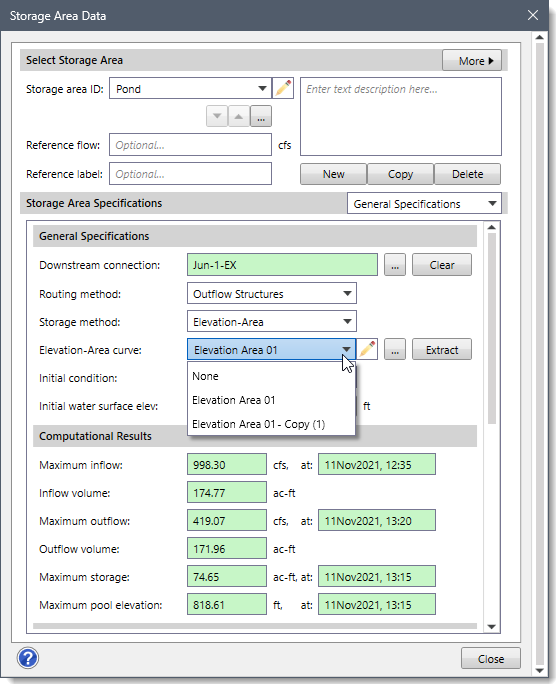
For example, as shown in the Storage Area Data dialog box, a storage area using the Elevation–Area storage method references an Elevation–Area curve (Elevation Area 01). When the current scenario is duplicated with the Basin model checkbox selected, the referenced elevation–area curve is also duplicated. The Elevation–Area curve dropdown list then displays both the original curve (Elevation Area 01) and a copied version (Elevation Area 01 – Copy (1)). The duplicated storage area is linked to the copied elevation–area curve, allowing users to modify storage characteristics in the new scenario without impacting the original scenario.