
The Duplicate Current Scenario command in GeoSTORM allows the user to make an identical copy of the current scenario. This copy is independent of and does not interact with the original after it has been created. If required, the user can also create copies of the current geometry model, storm model, or analysis specification data.
Follow the steps given below to use the Duplicate Current Scenario command:
- From the Input ribbon menu, select the Duplicate Current Scenario command from the Scenario Manager dropdown combo box.

- The Duplicate Current Scenario dialog box will be displayed, as shown below.
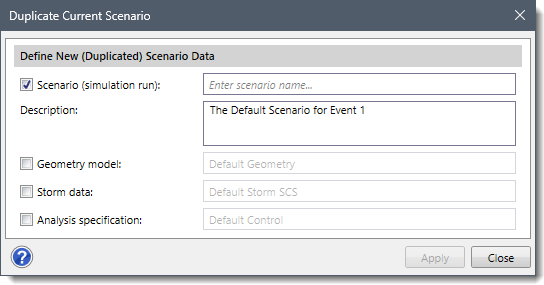
- Enter the scenario name in the Scenario (simulation run) entry field to create an identical copy of the current scenario. By default, the Scenario (simulation run) checkbox is checked. If unchecked, then the Scenario (simulation run) and Description entries are disabled.
- Enter the description in the Description entry to describe the scenario.
- By default, the software utilizes the current scenario’s geometry model, storm data, and analysis specifications for the duplicated scenario.
- Additionally, the user can check the Geometry model, Storm data, and Analysis specification checkboxes to create identical copies of the current scenario’s geometry, storm, and analysis specification data. Note that this is useful when creating alternative designs for comparison.
- Click the [Apply] button.
![[Apply] button](https://knowledge.civilgeo.com/wp-content/uploads/2024/07/Duplicate-Current-Scenario-GeoSTORM-Image-3.png)
- A copy of the current scenario will be successfully created.