
In hydrologic modeling, double counting occurs when imperviousness is included both in the curve number (CN) and as a separate impervious fraction in the same subbasin. This causes the impervious area to be counted twice in the analysis—once through the curve number and again through the percent impervious value. As a result, double counting may lead to an overestimation of runoff, oversized stormwater systems, or inaccurate floodplain mapping.
This article explains how to avoid double counting impervious areas while running the analysis in CivilGEO software.
Curve Number and Impervious Surface
The curve number is used to estimate direct runoff based on land use, soil type, and hydrologic conditions. CN values are typically provided in tables, such as those in NRCS TR-55. These tables generally incorporate the effect of imperviousness into their values for certain land uses, like urban or residential areas.
The impervious surface value defines the portion of the subbasin that does not allow water to infiltrate into the ground due to roads, rooftops, or sidewalks.
When modeling runoff using the SCS Curve Number method, the user can define both the curve number and impervious surface parameters in the Subbasin Data dialog box. Refer to this article in our knowledge base to learn more about the Subbasin Data command.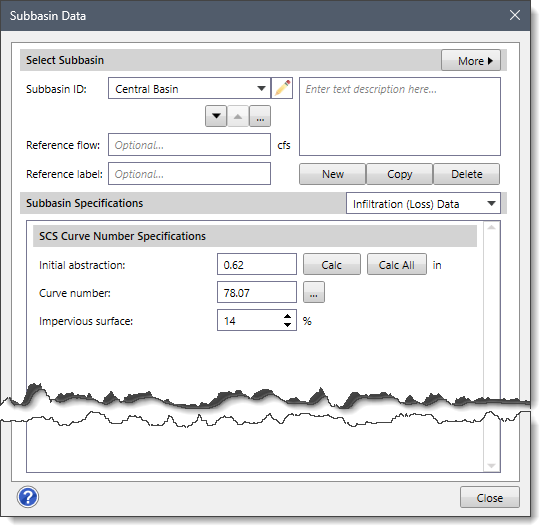
How to Avoid Double Counting
To avoid double counting, follow one of the following two methods:
Using Pre-Weighted Curve Number
If the curve number value already includes the effects of impervious surfaces for the defined land use (e.g., values from a standard table for “urban areas”), then the Impervious surface value should be set to zero. This prevents the impervious area from being counted twice.
The image below shows a standard curve number table that includes impervious surface effects.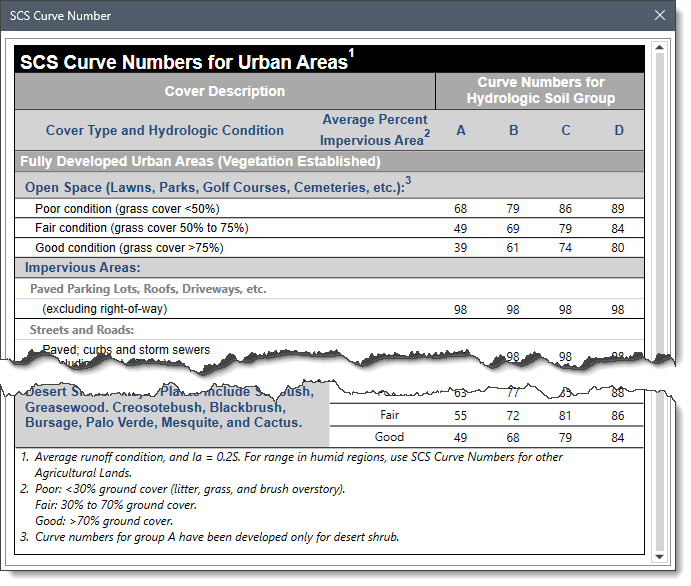
Separate Pervious and Impervious Values
If the curve number represents only the pervious area (e.g., grassland or undeveloped surface) of the subbasin, then the user should explicitly enter the impervious surface value. This allows the software to compute impervious runoff separately for the impervious portion and combine it with runoff from the pervious area.
Double Counting Example Scenario – New Residential Subdivision
The user selects a curve number for urban residential from a standard curve number table, which already assumes a certain level of imperviousness. Then, the user also enters a separate 30% impervious value for the same subbasin area. This causes the impervious surface to be counted twice in the analysis, resulting in overestimated runoff.
Correct Method:
The user selects a curve number for urban residential from a table that already accounts for imperviousness and enters 0% impervious for the same subbasin area. This avoids double counting and results in a more accurate runoff estimate.
Alternative Correct Method:
The user selects a curve number for grassland (representing only the pervious area of the subbasin) and then separately enters a 30% impervious value. This allows the software to compute runoff from both pervious and impervious areas appropriately, which avoids double counting.