
The Delete Scenarios command in GeoSTORM allows the user to select and delete scenario data, geometry data, storm data, and analysis specification data from a project. This command helps to reduce project file size by deleting data that are no longer relevant to a project or otherwise necessary.
Follow the steps below to use the Delete Scenarios command:
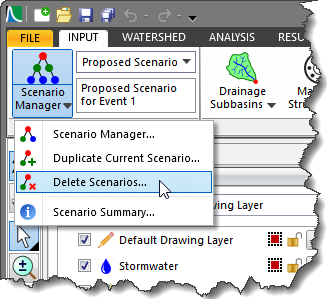
- From the Input ribbon menu, select the Delete Scenarios command from the Scenario Manager dropdown combo box.
- The Delete Scenarios dialog box will be displayed. This dialog box displays scenario (simulation run), geometry, storm, and analysis specification data associated with the project.
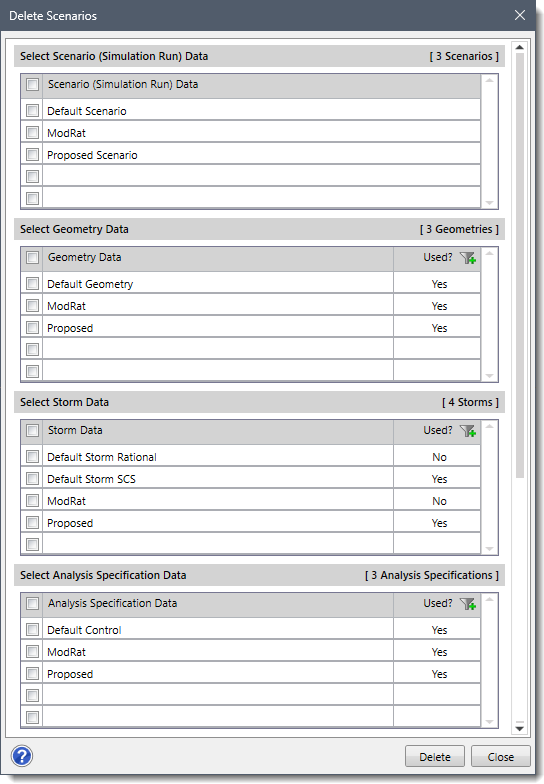
- Select the checkboxes corresponding to scenario, geometry, storm, and analysis specification data that needs to be removed from the project.
- Click the [Delete] button.
![[Delete] button](https://knowledge.civilgeo.com/wp-content/uploads/2024/07/Delete-Scenarios-GeoSTORM-Image-3.png)
- The software will successfully delete the selected scenario, geometry, storm, and analysis specification data.
Note that after the scenario data have been deleted from the project, they cannot be recovered with the Undo command. However, if the project is not saved, then the user can reload the project and the scenario data will still be present. Alternatively, if the project has been saved, then the project backup file can be used to recover the previous state of scenario data.