
The Outflow Routing data panel of the Storage Area Data dialog box will be enabled when Outflow Structures is selected as the routing method. Otherwise, this data panel entry is disabled (i.e., grayed out).
The following sections describe how to interact with the Outflow Routing data panel of the Storage Area Data dialog box.
Main Discharge Channel
This section contains the following options:
- Main tailwater submergence
This dropdown combo box entry defines how tailwater submergence effects on the outflow structures will be handled for the main (or primary) discharge location. This dropdown combo box provides the following entries:- Assume None (default)
- Storage Area Main Discharge
- Downstream of Main Discharge
- Specified Stage
- Fixed WSEL
- Elev-Discharge rating curve
This dropdown combo box is enabled if Storage Area Main Discharge or Downstream of Main Discharge is selected as the main tailwater submergence. This dropdown combo box allows the user to select an already-defined elevation discharge rating curve. Clicking the […] button displays an Elevation Discharge Rating Curve Data paired data dialog box that allows the user to define a new elevation discharge rating curve.
- Stage gage
This dropdown combo box is enabled if the Specified Stage is selected as the main tailwater submergence. This dropdown combo box allows the user to select an already defined stage gage. Clicking the […] button displays a User-Defined Stage Gage Data time series data dialog box that allows the user to define a new user-defined stage gage.
- Fixed water surface elev
This entry defines the fixed water surface elevation contained within the storage area. This entry is enabled if the Fixed WSEL is selected as the main tailwater submergence.
Auxiliary Discharge Channel
This section contains the following options:
- Auxiliary discharge connection
This optional entry defines the downstream element that the selected storage area drains to, which can consist of the following elements:- Diversion
- Junction
- Reach
- Storage Area
- Sink
All storage areas have a main (or primary) discharge to a downstream element. Flow through outlets, spillways, and other structures leaves the storage area and enters some type of downstream channel. However, some storage areas also have a separate auxiliary (or secondary) discharge location in addition to the main discharge location. The flow exiting through the auxiliary discharge connection does not enter the same channel as the main discharge. The auxiliary discharge may be an emergency spillway that enters a secondary channel that eventually enters the main downstream channel. The auxiliary discharge could also be a withdrawal for urban consumptive use or possibly an irrigation canal. Clicking the [Pick] button allows the user to select the downstream element from the Map View.
- Auxiliary tailwater submergence
This dropdown combo box entry defines how tailwater submergence effects on the outflow structures will be handled for the auxiliary discharge location. This entry is enabled if an Auxiliary discharge connection has been defined. This dropdown combo box provides the following entries:- Assume None
- Storage Area Main Discharge
- Downstream of Main Discharge
- Specified Stage
- Fixed WSEL
- Elev-Discharge rating curve
This dropdown combo box is enabled if Storage Area Main Discharge or Downstream of Main Discharge is selected as the auxiliary tailwater submergence. Clicking the […] button displays an Elevation Discharge Rating Curve Data paired data dialog box that allows the user to define a new elevation discharge rating curve.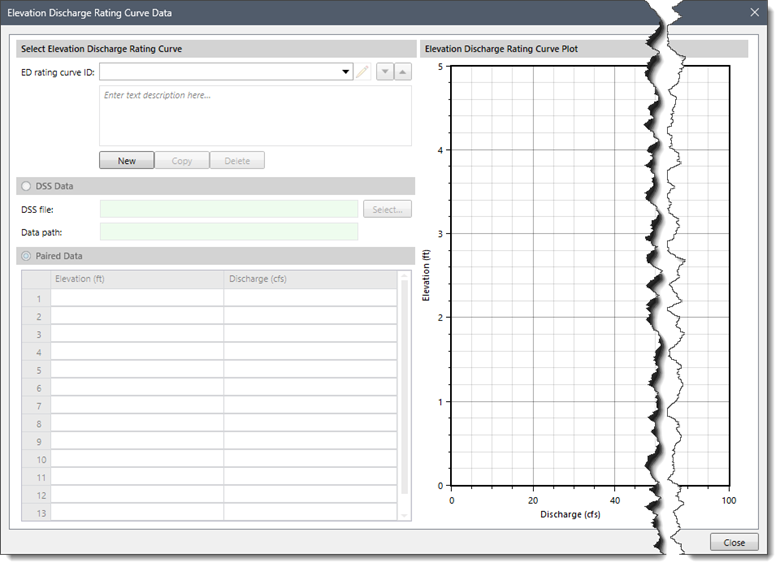
- Stage gage
This dropdown combo box is enabled if the Specified Stage is selected as the auxiliary tailwater submergence. This dropdown combo box allows the user to select an already defined stage gage. Clicking the […] button displays a User-Defined Stage Gage Data time series data dialog box that allows the user to define a new user-defined stage gage.
- Fixed water surface elev
This entry defines the fixed water surface elevation contained within the storage area. This entry is enabled if the Fixed WSEL is selected as the auxiliary tailwater submergence.
Other Options
This section contains the following options:
- Computational time step
This dropdown combo box entry defines the time step method for computing the simulation. This dropdown combo box provides the following entries:- Automatic Time Slicing
- Simulation Time Step
The Simulation Time Step method uses the time step specified in the analysis parameters and is adequate when the storage area pool elevation is changing slowly. However, when the storage area pool elevation is changing rapidly, like during a dam failure simulation, a shorter time step needs to be used. In this situation, the Automatic Time Slicing method should be selected. The software will then compute the time step interval to use based upon the rates at which the pool elevation, storage volume, and outflow area change. For preliminary simulations, especially for models with a long simulation time period, it is better to use the Simulation Time Step method where less precision is required.