
Computing subbasin slopes is a critical aspect of hydrologic modeling and watershed analysis. Some of the runoff methods being used in the stormwater project utilize the computed subbasin slope.
This article describes the computational method used to compute the subbasin slope and how the Compute Slopes command works in the CivilGEO software.
Subbasin Slope Computational Method
When calculating the slope for subbasins, the software uses an elevation grid, or Digital Elevation Model (DEM), and applies an algorithm that divides the subbasin area into smaller grid cells. The slope of each grid cell is then calculated based on the rate of change in both the horizontal and vertical directions from the center of the neighboring grid cells.
The illustration below demonstrates how the algorithm computes the slope of a subbasin on a cell-by-cell basis, analyzing the cells from left to right and top to bottom.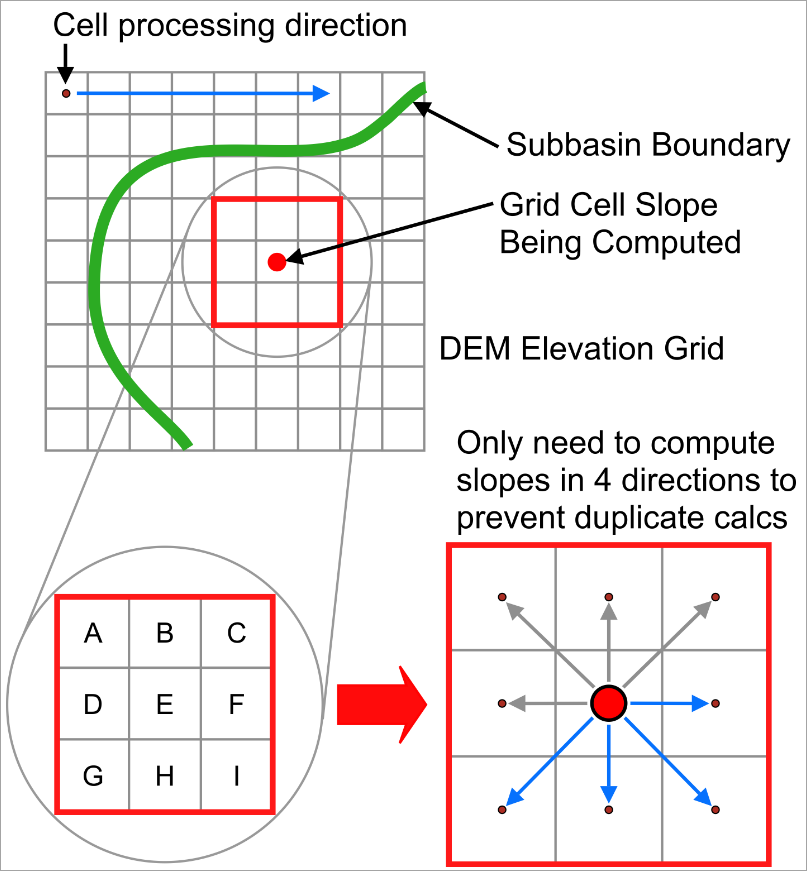
- The algorithm of the software does not store the slope for every grid cell. Instead, a slope accumulator keeps track of the total slope, and a cell count accumulator counts how many cells have had their slope calculated.
- The slope is only calculated in four directions (shown as blue lines in the illustration). The other four directions (grey lines) do not need to be calculated again because they were already processed in the previous row of cells.
- Only the cells within the subbasin boundary are considered. Cells outside the boundary are skipped.
- For each cell, the slope is calculated in all four directions, and the absolute value of each slope is determined. The slope can represent either an upward or downward gradient, but by taking the absolute value, the algorithm is only concerned with the steepness or rate of change, not the direction (up or down). For example, a slope of -5 (downward) and a slope of +5 (upward) both have an absolute value of 5, focusing purely on the steepness.
- The direction with the steepest slope is assigned to the cell whose slope is being computed. This maximum slope value is added to the slope accumulator, and the cell count accumulator is increased by one.
- The above algorithm is repeated for every cell in the subbasin.
For the above illustration, the following equations are used to compute the cell slopes:
Where, abs = Absolute slope value
Note: The subbasin slope is equal to the slope accumulator divided by the cell count accumulator.
Compute Slopes Command
Follow these steps to use the Compute Slopes command:
- From the Watershed ribbon menu, select the Compute Slopes command.
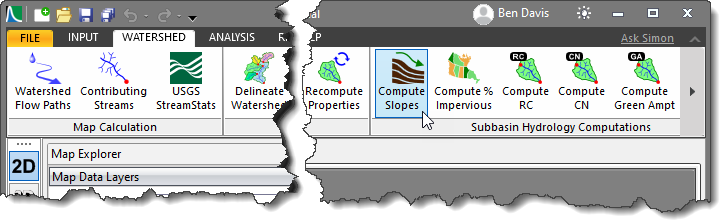
- The Compute Slopes dialog box will be displayed.
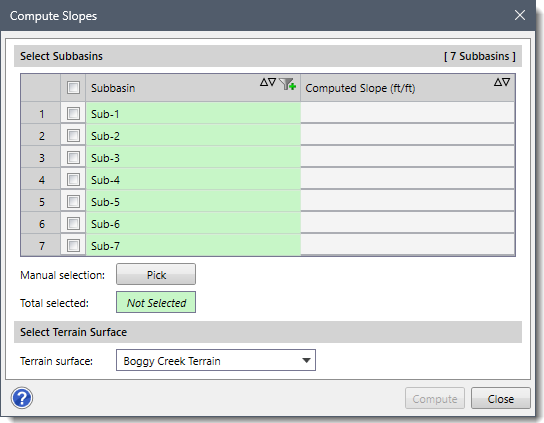
The following sections describe how to use the Compute Slopes command and interact with the above dialog box.
Selecting Subbasins
The Select Subbasins section includes a table that lists all the subbasins contained within the current scenario.
This section is used to manually select subbasins from the Map View. If a subbasin is already selected on the Map View prior to running this command, the same subbasin will be shown selected within the table.
Alternatively, click the [Pick] button to interactively select subbasins from the Map View. Clicking on the [Pick] button will cause the dialog box to temporarily disappear, allowing the user to select subbasins from the Map View. Upon returning to the Compute Slopes dialog box, the total number of selected subbasins will be displayed in the Total selected entry.
Selecting Terrain Surface
The Terrain surface dropdown combo box lists all the elevation grids (i.e., DEMs) loaded in the project. Select the elevation grid to be used in computing the subbasin slope.
Computing Subbasin Slopes
Once the data have been defined in the Compute Slopes dialog box, click the [Compute] button. The software will then look at each subbasin selected and compute the average overland flow slope for each subbasin.
After the slopes are computed, the values will be shown in the Computed Slope (ft/ft) editable column, as shown below. The software also allows the user to modify these computed values.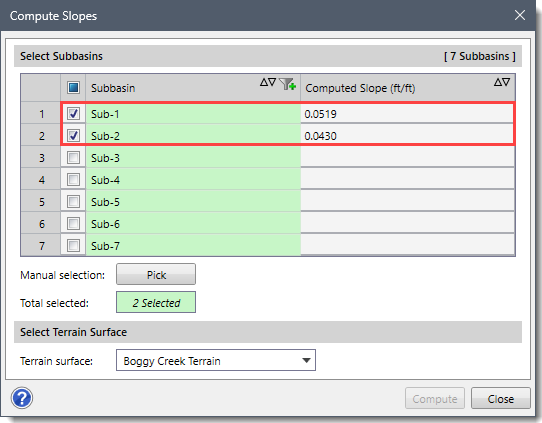
Once the slope is computed, all stormwater runoff methods that require a subbasin slope will have the data populated into the appropriate fields.